Smudged Copy Photo Effect: Adding Authentic Texture to Your Designs
Beyond the Filter: The Handcrafted Appeal of a Smudged Effect
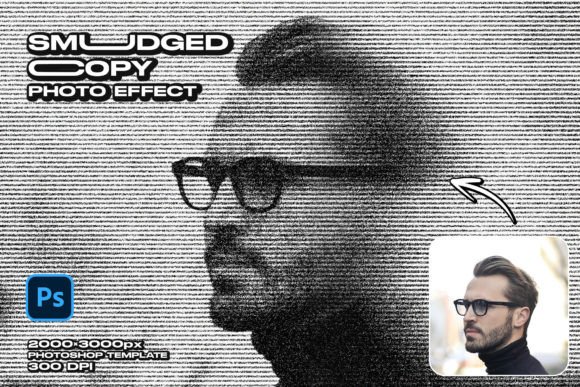
In a digital landscape often dominated by sterile perfection, there’s a powerful draw towards textures that feel real, lived-in, and human. We’re moving away from the overly polished, high-gloss imagery that once defined professional design, seeking instead a visual language that conveys authenticity and story. This is precisely where the Smudged Copy Photo Effect finds its place. It’s not just a filter; it’s a digital translation of a tangible, almost accidental process—the look of a photocopied image that’s been handled, its ink slightly displaced by a thumbprint or the drag of a hand.
This effect introduces a layer of beautiful imperfection. It’s characterized by soft, directional streaks and subtle warping that mimic the smearing of wet ink. The result is an image that feels less like a sterile digital capture and more like a physical artifact. There’s an inherent nostalgia to it, a nod to the zine culture and DIY print shops of the past, yet when applied with intention, it feels incredibly contemporary and artistic. The Smudged Copy Photo Effect template provides this look with high-resolution fidelity, ensuring the texture enhances your subject rather than overwhelming it.
Where Does This Artistic Style Thrive?
The strength of the Smudged Copy Photo Effect lies in its versatility across projects that aim to stand out with a unique personality. It’s a fantastic tool for breaking visual monotony and injecting a dose of raw creativity. Consider its application in:
- Editorial Design & Publishing: For magazine covers, feature article headers, or book jackets, especially within genres like music, art, poetry, or memoir. It lends an immediate sense of grit and artistic depth.
- Branding & Marketing: Ideal for brands with an edgy, artisanal, or retro-modern identity. Think independent record labels, craft breweries, vintage clothing stores, or boutique coffee roasters. It can be used in social media graphics, website hero images, or print ads to stop the scroll and create a memorable impression.
- Personal Creative Projects: Photographers and artists can use it to create a signature look for a portfolio or a specific series. It’s also perfect for creating unique prints, posters, or even album art that demands a tactile, handcrafted feel.
This isn't a style for a corporate law firm's annual report, but for any project where brand identity leans into storytelling, emotion, and a distinct point of view, it’s an incredibly powerful design asset.
Practical Application: Working with the PSD Template
While the aesthetic is complex, using the template is designed to be straightforward, even for those with basic Photoshop skills. The key is the smart object layer. You simply open the designated layer, place your own photograph, save, and the entire smudged copy effect is automatically applied to your image.
However, to get the best results, a little strategic thinking goes a long way:
- Choose Your Source Image Wisely: Not every photo will work equally well. Images with strong composition, clear subjects, and a good range of tones tend to respond best. Portraits, architectural details, and still life shots often look stunning with this effect, as the smudging can accentuate lines and forms in a compelling way.
- Consider the Context: Think about how the final image will be used. If it’s for a website header, ensure the main subject isn't obscured by the smudge in a way that hinders understanding. For a standalone art print, you have more freedom to let the effect take center stage.
- Font Pairing is Crucial: The texture of the effect will interact with any typography you overlay. Pairing it with a clean, strong sans serif font can create a beautiful contrast between the organic texture and structured type. Alternatively, a handwritten font or a rough script font can amplify the DIY, handcrafted vibe. Avoid overly delicate or intricate serif fonts that might get lost in the visual noise.
Remember, the goal is harmony. The Smudged Copy Photo Effect is a bold stylistic choice, so let it be the hero of your visual. Use it to create a focal point, and build the rest of your design—whether it's a logo design, a social media post, or a piece of packaging design